
How-To Guides
How To Change a Clock Battery
A stopped miniature clock usually just needs a fresh battery — here’s how to change it in a couple of minutes.
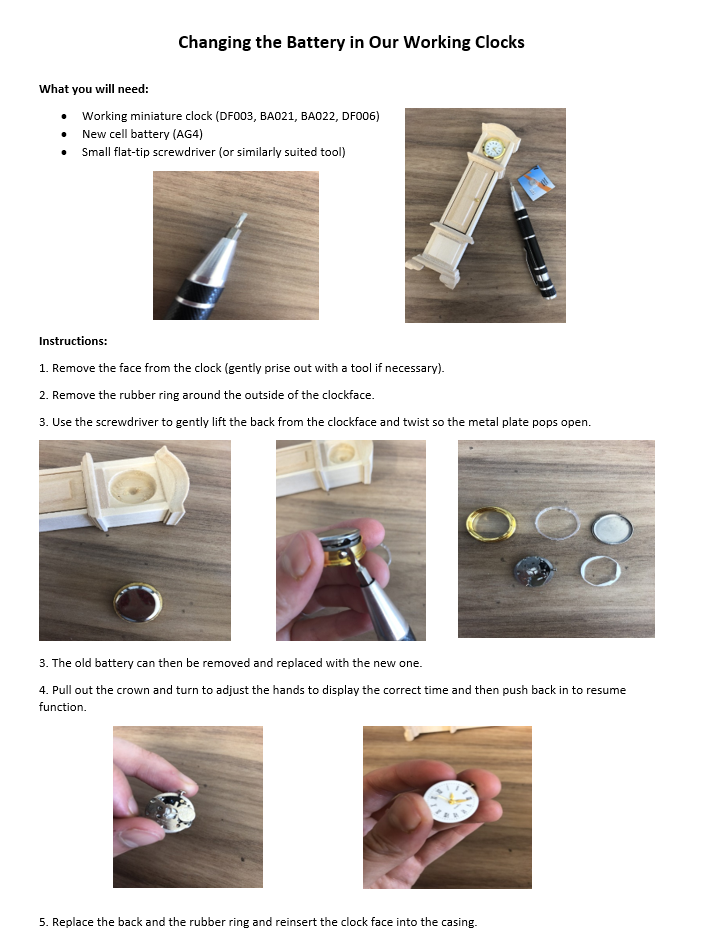
Many of our miniature clocks are powered by a small button-cell battery, so when the hands stop moving there is rarely anything wrong with the clock itself. Swapping in a fresh battery is a quick, simple job — the illustration below shows exactly what to do, and the steps that follow talk you through it.
Changing the Battery, Step by Step
Open the Battery Compartment
Locate the battery compartment — on most miniature clocks it sits on the back of the case — and gently open it, as shown in the illustration above.
Remove the Old Battery
Before you lift the old battery out, take note of which way round it sits so you can fit the replacement the same way.
Fit the New Battery
Insert a fresh battery of the same type as the old one, making sure it faces the same way round and sits snugly in place.
Close Up and Check
Close the compartment, check the clock is running again and set it to the correct time. That’s it — job done.
Battery safety: button-cell batteries and miniature clocks are small parts — our products are intended for adult collectors aged 14 and over. Keep new and spent batteries well away from children and pets, and always dispose of old batteries responsibly.
Finishing Touches for Every Room
Explore clocks, ornaments and hundreds of other 1:12 scale accessories for your dolls house.
Shop AccessoriesKeep Exploring
More From Our Guides
Battery Lights
Add light to your dolls house without any wiring at all.
View Guide →Cleaning a Dolls House
Keep your house and miniatures dust-free without harming delicate pieces.
View Guide →Essential Tools
The small toolkit every miniaturist should keep to hand.
View Guide →